
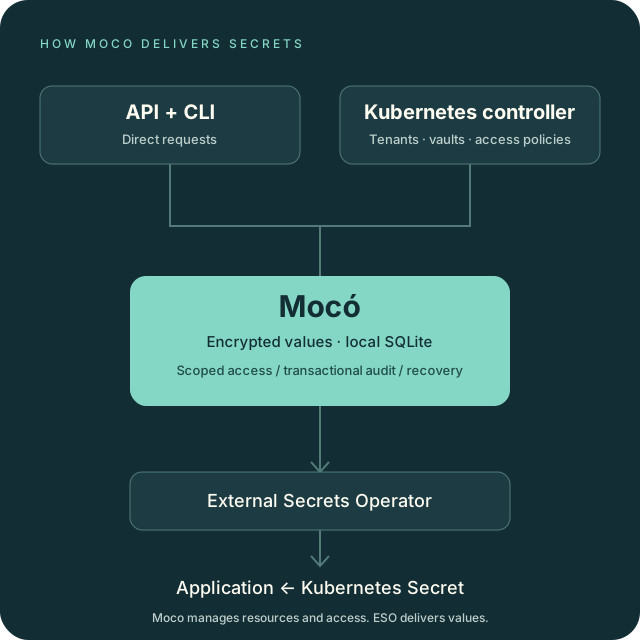
Manage secrets through the API or CLI
Organize secrets into tenants and vaults, then address each secret with a path
such as prod/database/password. Read metadata separately from values. Use
conditional updates to avoid overwriting a newer version.
The CLI uses commands such as moco tenants list. Tables are the default;
choose JSON for scripts or CSV for tabular exports.
Read the CLI guide or browse the API reference.
Declare resources and access in Kubernetes
Keep tenants, vaults and access policies in Git using MocoTenant, MocoVault
and MocoAuthorization. The Moco controller reconciles these resources and
repairs drift. Set up the controller.
External Secrets Operator, or ESO, reads permitted values through its webhook provider and creates Kubernetes Secrets for your applications. Connect Moco to ESO.
Audit writes and recover your data
Moco encrypts secret values with a separate key for each vault and lets you rotate the root key. Successful API changes and their audit records commit in the same SQLite transaction. If Moco cannot write the audit record, it rolls back the change. Read the audit guarantees.
Automatic backups capture the full database and copy verified archives to a configured mirror. Restore offline with the required historical root keys, which you keep separately from the backups. Configure backups and rehearse a restore.
Deploy Moco 0.0.3
Run one server with local SQLite using Docker Compose or Helm. Add the separate controller when you want Kubernetes to manage resources and access. The released server and controller images support Linux amd64 and arm64, and both Helm charts pin their images by digest. Install the release.
Keep SQLite data on a local filesystem and maintain an off-host backup copy. The supported topology has one writer, with downtime during recovery. Follow the production runbook.
The published v0.0.3 images and charts passed 21 Kubernetes integration and recovery scenarios, including token rotation, root-key rotation and a database restore followed by fresh secret delivery through ESO. Review the test results and limits.